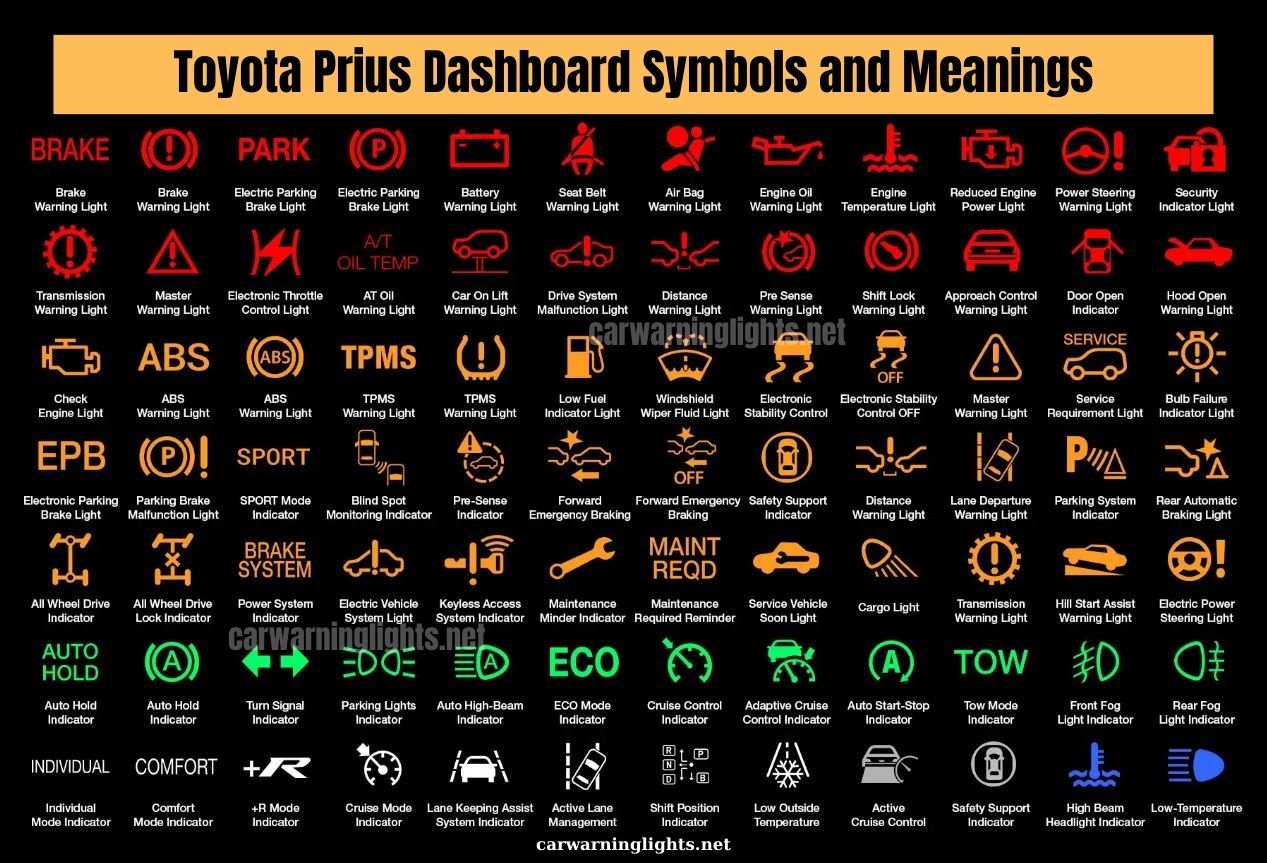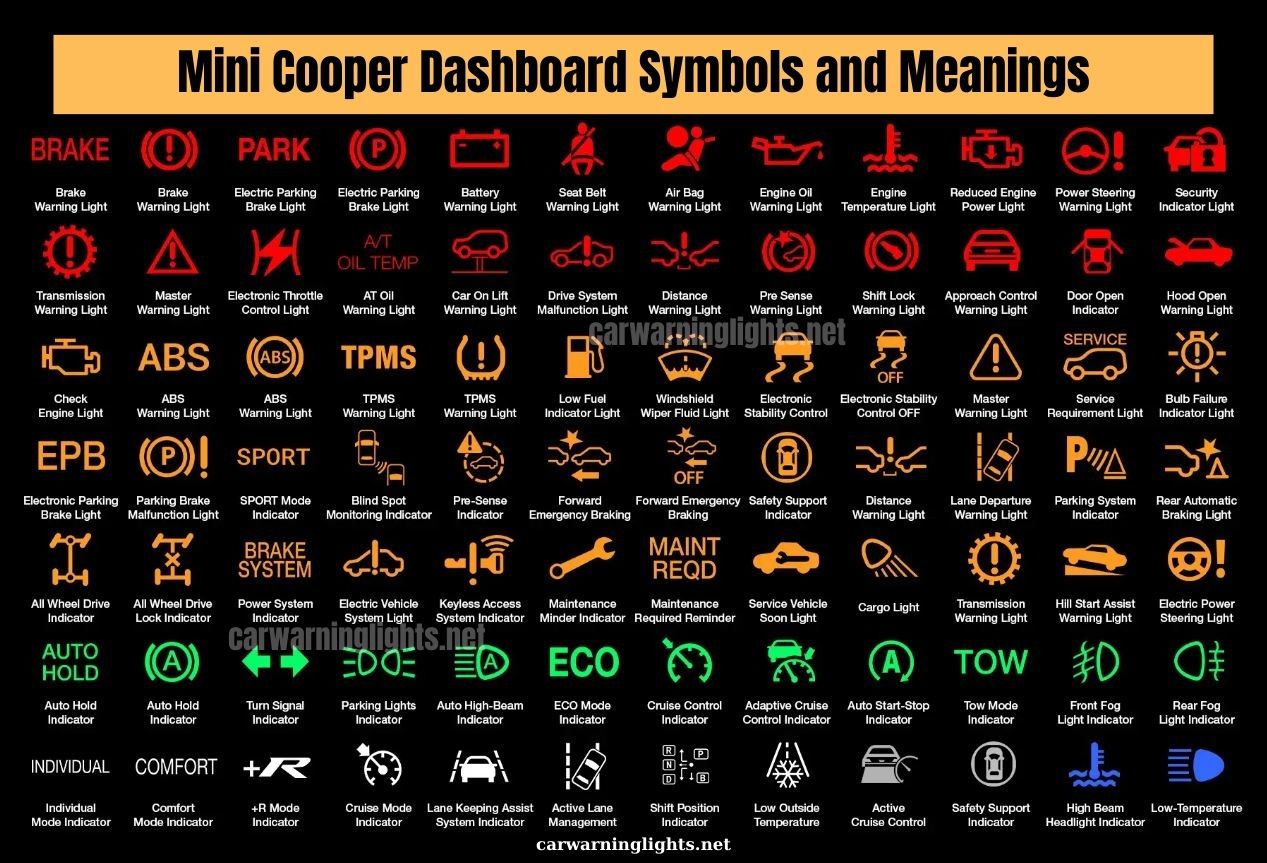

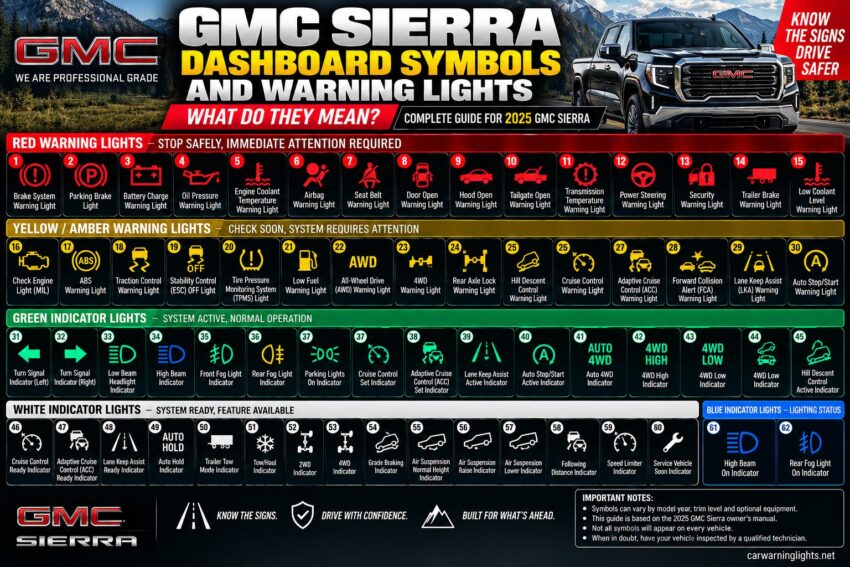
Seeing a warning light on your GMC Sierra dashboard can be confusing, especially when you do not recognize the symbol. This guide explains the most important GMC Sierra dashboard symbols and warning lights, what they mean, and what you should do when they appear.
The guide below is organized to match the numbered infographic above. Find the number on the dashboard symbol, then scroll to the same number for the detailed explanation.
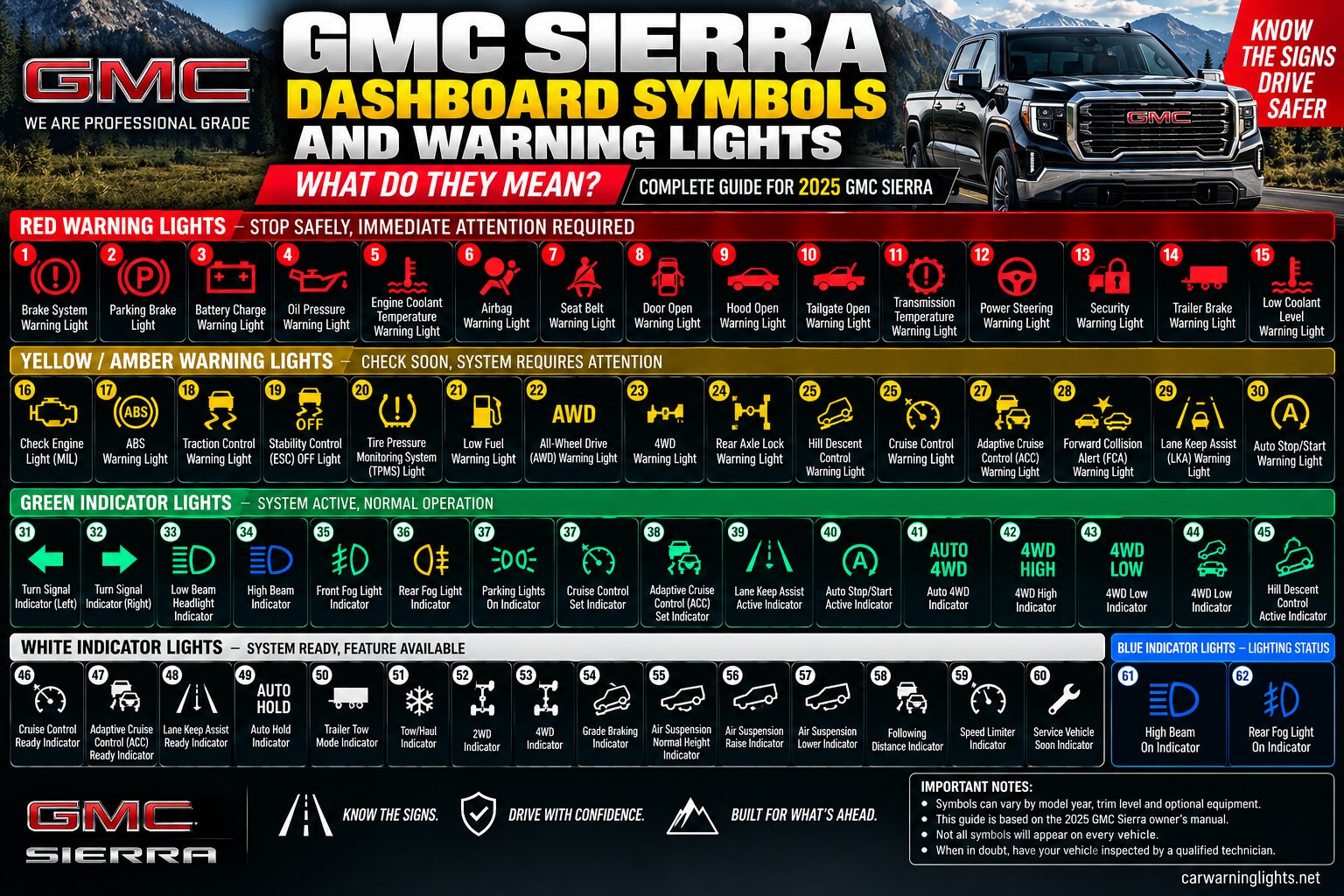
Quick Reference: GMC Sierra Dashboard Warning Lights
| Color | Numbers | General Meaning |
|---|---|---|
| Red | 1–15 | Stop safely / immediate attention |
| Yellow / Amber | 16–30 | Check the system / service may be required |
| Green | 31–45 | System active / normal operation |
| White | 46–60 | System ready / selected |
| Blue | 61–62 | Lighting status |
Red Warning Lights (1–15)
These warnings generally require immediate attention. Serious brake, oil-pressure, overheating, steering, restraint, and similar warnings should not be ignored.
1. Brake System Warning Light
Red: Indicates a brake-system problem or low brake fluid. If it stays on while driving, pull over safely and have the brake system inspected. The 2025 owner’s manual warns that continued driving with this warning can be dangerous.
Can I drive? Stop as soon as it is safe and arrange service.
2. Parking Brake Light
Red: Shows that the parking brake is applied. If it remains on after the parking brake is released, the system should be checked before normal driving.
Can I drive? Stop as soon as it is safe and arrange service.
3. Battery / Charging System Warning Light
Red: Indicates a possible charging-system problem. The battery may discharge while driving, so have the electrical system checked promptly.
Can I drive? Stop as soon as it is safe and arrange service.
4. Oil Pressure Warning Light
Red: Indicates low engine oil pressure. Stop safely, switch off the engine, check the oil level, and do not continue driving if the pressure remains low.
Can I drive? Stop as soon as it is safe and arrange service.
5. Engine Coolant Temperature Warning Light
Red: Indicates that engine coolant temperature is too high. Safely stop and allow the engine to cool before investigating the cause.
Can I drive? Stop as soon as it is safe and arrange service.
6. Airbag Warning Light
Red: Indicates a possible problem with the airbag system. If it remains on after startup, have the vehicle inspected as soon as possible.
Can I drive? Stop as soon as it is safe and arrange service.
7. Seat Belt Warning Light
Red: Reminds the driver or passenger to fasten a seat belt. It may flash and sound a chime until the belt is properly fastened.
Can I drive? Stop as soon as it is safe and arrange service.
8. Door Open Warning Light
Red: Indicates that a door is open or not securely latched. Make sure all doors are fully closed before driving.
Can I drive? Stop as soon as it is safe and arrange service.
9. Hood Open Warning Light
Red: Indicates that the hood is open or not fully latched. Stop and secure the hood before driving.
Can I drive? Stop as soon as it is safe and arrange service.
10. Tailgate Open Warning Light
Red: Indicates that the tailgate is open or not securely latched. Make sure it is fully closed before driving.
Can I drive? Stop as soon as it is safe and arrange service.
11. Transmission Temperature Warning Light
Red: Indicates that transmission temperature may be too high. Reduce load, stop safely if necessary, and allow the transmission to cool.
Can I drive? Stop as soon as it is safe and arrange service.
12. Power Steering Warning Light
Red: Indicates a possible steering-system problem. Steering assistance may be reduced, so have the vehicle inspected promptly.
Can I drive? Stop as soon as it is safe and arrange service.
13. Security Warning Light
Red: Indicates a possible theft-deterrent or immobilizer problem. If the engine will not start and the light stays on, follow the owner’s manual troubleshooting steps and seek service.
Can I drive? Stop as soon as it is safe and arrange service.
14. Trailer Brake Warning Light
Red: May indicate a problem with the trailer brake system or trailer connection. Check the trailer connection and brake system before towing.
Can I drive? Stop as soon as it is safe and arrange service.
15. Low Coolant Level Warning Light
Red: Indicates that coolant level may be low on equipped vehicles. Allow the engine to cool before checking coolant and investigate any leak.
Can I drive? Stop as soon as it is safe and arrange service.
Yellow / Amber Warning Lights (16–30)
These symbols indicate a system condition, fault, or driver-assistance warning that should be checked. The exact urgency depends on the symbol and DIC message.
16. Check Engine / Malfunction Indicator Light (MIL)
Yellow / Amber: Indicates that the engine or emissions system has detected a fault. A steady light generally calls for service; a flashing light requires more urgent attention.
Can I drive? Usually, if the vehicle is operating normally, but check the warning and the Driver Information Center for additional messages.
17. ABS Warning Light
Yellow / Amber: Indicates a problem with the Anti-lock Brake System. The regular brakes may still work, but ABS may not; have the vehicle serviced.
Can I drive? Usually, if the vehicle is operating normally, but check the warning and the Driver Information Center for additional messages.
18. Traction Control Warning Light
Yellow / Amber: Indicates traction control activity or a traction-control condition. A flashing light can mean the system is actively limiting wheel slip.
Can I drive? Usually, if the vehicle is operating normally, but check the warning and the Driver Information Center for additional messages.
19. StabiliTrak / ESC Off Light
Yellow / Amber: Indicates that StabiliTrak/Electronic Stability Control has been switched off. Vehicle stability assistance may be reduced.
Can I drive? Usually, if the vehicle is operating normally, but check the warning and the Driver Information Center for additional messages.
20. Tire Pressure Monitoring System (TPMS) Light
Yellow / Amber: Indicates that one or more tires may be significantly underinflated. Check all tire pressures and inflate them to the pressure shown on the vehicle label.
Can I drive? Usually, if the vehicle is operating normally, but check the warning and the Driver Information Center for additional messages.
21. Low Fuel Warning Light
Yellow / Amber: Indicates that fuel level is low. Refuel as soon as practical, especially before a long trip.
Can I drive? Usually, if the vehicle is operating normally, but check the warning and the Driver Information Center for additional messages.
22. All-Wheel Drive (AWD) Warning Light
Yellow / Amber: On applicable configurations, an amber AWD indication can signal a fault in the all-wheel-drive system. Have the system checked if the warning remains.
Can I drive? Usually, if the vehicle is operating normally, but check the warning and the Driver Information Center for additional messages.
23. Four-Wheel Drive (4WD) Warning Light
Yellow / Amber: Shows four-wheel-drive status or, when amber, may indicate a 4WD fault. The 2025 manual says the 4WD display can show 2WD, 4HI, AUTO, 4LOW and N depending on the transfer case.
Can I drive? Usually, if the vehicle is operating normally, but check the warning and the Driver Information Center for additional messages.
24. Rear Axle Lock Indicator / Warning
Yellow / Amber: Indicates rear axle locker status on equipped trucks. Use the feature according to the owner’s manual and driving conditions.
Can I drive? Usually, if the vehicle is operating normally, but check the warning and the Driver Information Center for additional messages.
25. Hill Descent Control Light
Yellow / Amber: Shows Hill Descent Control status. The manual states that the light comes on when the system is ready and flashes when the system is active.
Can I drive? Usually, if the vehicle is operating normally, but check the warning and the Driver Information Center for additional messages.
26. Cruise Control Warning / Fault Light
Yellow / Amber: Indicates that cruise-control operation may be unavailable or that a fault has been detected. Check the system if the warning persists.
Can I drive? Usually, if the vehicle is operating normally, but check the warning and the Driver Information Center for additional messages.
27. Adaptive Cruise Control (ACC) Warning Light
Yellow / Amber: Indicates an ACC system issue or that the feature is unavailable. Clean the relevant camera/sensor area and seek service if the warning remains.
Can I drive? Usually, if the vehicle is operating normally, but check the warning and the Driver Information Center for additional messages.
28. Forward Collision Alert (FCA) Warning Light
Yellow / Amber: Indicates a forward-collision system alert or limitation. FCA may be unavailable when its camera/sensors are blocked or conditions limit detection.
Can I drive? Usually, if the vehicle is operating normally, but check the warning and the Driver Information Center for additional messages.
29. Lane Keep Assist (LKA) / Lane Departure Warning Light
Yellow / Amber: Indicates LKA/LDW status or an active lane-departure alert. The system requires suitable lane markings and a clear camera view.
Can I drive? Usually, if the vehicle is operating normally, but check the warning and the Driver Information Center for additional messages.
30. Auto Stop / Stop-Start Warning Light
Yellow / Amber: Indicates a Stop/Start system condition or fault depending on the displayed message. If a fault remains, have the system checked.
Can I drive? Usually, if the vehicle is operating normally, but check the warning and the Driver Information Center for additional messages.
Green Indicator Lights (31–45)
Green indicators generally show that a lighting, driving, or assistance system is active or operating.
31. Left Turn Signal Indicator
Green: Shows that the left turn signal is operating. An unusually fast flash can indicate an exterior turn-signal lamp problem.
Can I drive? Yes, this is generally an operating or readiness indicator rather than an urgent warning.
32. Right Turn Signal Indicator
Green: Shows that the right turn signal is operating. An unusually fast flash can indicate an exterior turn-signal lamp problem.
Can I drive? Yes, this is generally an operating or readiness indicator rather than an urgent warning.
33. Low Beam Headlight Indicator
Green: Shows that the low-beam headlights are on.
Can I drive? Yes, this is generally an operating or readiness indicator rather than an urgent warning.
34. High Beam Indicator
Green: Shows the high-beam lighting function in the infographic. The owner’s manual separately identifies the High-Beam On Light as a blue indicator.
Can I drive? Yes, this is generally an operating or readiness indicator rather than an urgent warning.
35. Front Fog Light Indicator
Green: Shows that the front fog lamps are switched on, if equipped.
Can I drive? Yes, this is generally an operating or readiness indicator rather than an urgent warning.
36. Rear Fog Light Indicator
Green: Shows that the rear fog lamp is on, where equipped.
Can I drive? Yes, this is generally an operating or readiness indicator rather than an urgent warning.
37. Parking Lights Indicator
Green: Shows that the parking/exterior lamps are on.
Can I drive? Yes, this is generally an operating or readiness indicator rather than an urgent warning.
38. Cruise Control Set Indicator
Green: Indicates that conventional cruise control is actively set at a selected speed.
Can I drive? Yes, this is generally an operating or readiness indicator rather than an urgent warning.
39. Adaptive Cruise Control (ACC) Set Indicator
Green: Indicates that ACC is active at a selected speed when equipped.
Can I drive? Yes, this is generally an operating or readiness indicator rather than an urgent warning.
40. Lane Keep Assist Active Indicator
Green: Indicates that LKA is on and ready to provide steering assistance when conditions are met.
Can I drive? Yes, this is generally an operating or readiness indicator rather than an urgent warning.
41. Auto Stop/Start Active Indicator
Green: Shows that the engine has automatically stopped as part of the Stop/Start system. It can restart automatically when conditions require it.
Can I drive? Yes, this is generally an operating or readiness indicator rather than an urgent warning.
42. Auto 4WD Indicator
Green: Shows that the transfer case is in AUTO 4WD mode on equipped trucks.
Can I drive? Yes, this is generally an operating or readiness indicator rather than an urgent warning.
43. 4WD High Indicator
Green: Shows that 4HI has been selected. Use this mode according to road and traction conditions.
Can I drive? Yes, this is generally an operating or readiness indicator rather than an urgent warning.
44. 4WD Low Indicator
Green: Shows that 4LO has been selected. This mode is intended for low-speed, high-traction situations.
Can I drive? Yes, this is generally an operating or readiness indicator rather than an urgent warning.
45. Hill Descent Control Active Indicator
Green: Indicates that Hill Descent Control is actively controlling vehicle speed on a descent.
Can I drive? Yes, this is generally an operating or readiness indicator rather than an urgent warning.
White Indicator Lights (46–60)
White indicators generally show that a feature is ready, selected, or displaying its current operating mode.
46. Cruise Control Ready Indicator
White: Indicates that conventional cruise control is ready to be activated but is not currently controlling speed.
Can I drive? Yes, this is generally an operating or readiness indicator rather than an urgent warning.
47. Adaptive Cruise Control Ready Indicator
White: Indicates that ACC is available and ready to be set, when equipped.
Can I drive? Yes, this is generally an operating or readiness indicator rather than an urgent warning.
48. Lane Keep Assist Ready Indicator
White: A steady white LKA indication means the system is not yet ready to assist. It may change to green when conditions are met.
Can I drive? Yes, this is generally an operating or readiness indicator rather than an urgent warning.
49. Automatic Vehicle Hold Indicator
White: Shows Automatic Vehicle Hold status on equipped configurations.
Can I drive? Yes, this is generally an operating or readiness indicator rather than an urgent warning.
50. Trailer Tow Mode Indicator
White: Indicates a trailer-related mode or trailer-tow setting on equipped vehicles.
Can I drive? Yes, this is generally an operating or readiness indicator rather than an urgent warning.
51. Snow/Ice Mode Indicator
White: Indicates that Snow/Ice Mode has been selected. This drive mode changes vehicle behavior for slippery conditions.
Can I drive? Yes, this is generally an operating or readiness indicator rather than an urgent warning.
52. Tow/Haul Indicator
White: Shows that Tow/Haul Mode is selected. The mode is intended for towing or carrying a heavy load.
Can I drive? Yes, this is generally an operating or readiness indicator rather than an urgent warning.
53. 2WD Indicator
White: Shows that the transfer case is in 2WD on equipped four-wheel-drive models.
Can I drive? Yes, this is generally an operating or readiness indicator rather than an urgent warning.
54. 4WD Indicator
White: Shows that four-wheel drive is selected. The exact display depends on the transfer-case configuration.
Can I drive? Yes, this is generally an operating or readiness indicator rather than an urgent warning.
55. Grade Braking Indicator
White: Indicates grade-braking operation or availability on equipped configurations, helping manage vehicle speed on descents.
Can I drive? Yes, this is generally an operating or readiness indicator rather than an urgent warning.
56. Air Suspension Normal Height Indicator
White: Shows the normal ride-height setting on trucks equipped with an applicable air-suspension system.
Can I drive? Yes, this is generally an operating or readiness indicator rather than an urgent warning.
57. Air Suspension Lower Ride Height Indicator
White: Indicates an air-suspension ride-height change or lowered setting on equipped configurations.
Can I drive? Yes, this is generally an operating or readiness indicator rather than an urgent warning.
58. Following Distance Indicator
White: Indicates following-distance status for a driver-assistance system when equipped.
Can I drive? Yes, this is generally an operating or readiness indicator rather than an urgent warning.
59. Speed Limiter Indicator
White: Shows that a speed-limiting feature is available or active on equipped configurations.
Can I drive? Yes, this is generally an operating or readiness indicator rather than an urgent warning.
60. Service Vehicle Indicator
White: Indicates that a vehicle system may require inspection or service. Check the Driver Information Center for the specific message.
Can I drive? Yes, this is generally an operating or readiness indicator rather than an urgent warning.
Blue Indicator Lights (61–62)
Blue is commonly used for lighting status, especially high-beam operation.
61. High Beam On Indicator
Blue: Indicates that the high-beam headlamps are currently on. The 2025 owner’s manual identifies this as the High-Beam On Light.
Can I drive? Yes, this is generally an operating or readiness indicator rather than an urgent warning.
62. Rear Fog Light On Indicator
Blue: Indicates that the rear fog lamp is on on equipped vehicles.
Can I drive? Yes, this is generally an operating or readiness indicator rather than an urgent warning.
What Should You Do When a GMC Sierra Warning Light Comes On?
- Look at the color. Red warnings deserve the most immediate attention.
- Match the symbol. Find its number in the infographic and then read the same numbered section below.
- Read the Driver Information Center (DIC). GMC may display a more specific message alongside the warning light.
- Do not ignore serious warnings. Brake, oil-pressure, overheating, and similar warnings can indicate conditions that may affect safety or damage the vehicle.
- Check the owner’s manual. Equipment and warning-light availability vary by configuration.
GMC Sierra Check Engine Light
The Check Engine or Malfunction Indicator Lamp monitors engine and emissions-related systems. A steady light generally means a fault has been detected and the vehicle should be diagnosed. A flashing light is more urgent and can indicate a condition that may cause further damage.
GMC Sierra Oil Pressure Warning Light
If the oil-pressure warning light comes on while driving, safely stop and turn off the engine. Check the oil level. Do not continue operating the truck if the warning remains or oil pressure is still low.
GMC Sierra TPMS Warning Light
The tire-pressure warning light indicates that one or more tires may be significantly underinflated. Check all tires and inflate them to the pressure specified on the Tire and Loading Information label. If the light flashes and then stays on, the TPMS itself may have a problem.
GMC Sierra ABS Warning Light
If the ABS warning light stays on, the anti-lock braking function may not be available even though the regular brakes can still operate. If the ABS and brake-system warning lights are on together, the braking system requires prompt inspection.
GMC Sierra 4WD Warning Light
The 4WD display can show the selected drivetrain mode, including 2WD, 4HI, AUTO and, on two-speed transfer cases, 4LOW and N. The display can flash while a shift is in progress. An amber indication can signal a four-wheel-drive malfunction.
GMC Sierra Tow/Haul Light
The Tow/Haul indicator shows that Tow/Haul Mode has been activated. This mode is designed for towing a heavy trailer or carrying a large or heavy load.
GMC Sierra Warning Lights FAQ
What does a red warning light mean on a GMC Sierra?
A red warning light generally indicates a condition that can require immediate attention. Brake, oil-pressure, overheating, and certain steering or restraint warnings should not be ignored.
What does a yellow warning light mean on a GMC Sierra?
Yellow or amber usually indicates that a system needs attention, is unavailable, or has detected a fault. The exact urgency depends on the symbol and the message shown in the Driver Information Center.
Why are some GMC Sierra dashboard lights only available on certain trucks?
The 2025 owner’s manual explains that equipment varies by model, trim, engine, drivetrain, market, and optional features. As a result, not every Sierra will display every symbol in this guide.
Can I keep driving when a GMC Sierra warning light comes on?
It depends on the symbol. Some green and white indicators are normal operating or readiness lights. Serious red warnings may require you to stop safely, while yellow warnings often call for diagnosis or service.
Source and Model-Year Note
This guide uses the 2025 GMC Sierra/Sierra Denali 1500 Owner’s Manual as the primary reference. General explanations are written to be useful to GMC Sierra owners, but individual symbols can vary between model years and equipment levels.
Always refer to the owner’s manual for your specific GMC Sierra before making a safety-related decision.